
Free & Easy – PNR Converter to create Flight Itinerary online
Convert raw PNRs from Amadeus, Sabre, Galileo, and Worldspan into professional flight itineraries instantly. Free, fast, and easy to use.
Raw GDS PNR Input
Display & Print Options
Ready to Convert Your PNR
Paste your raw airline PNR above and click Convert PNR.
Supported Formats
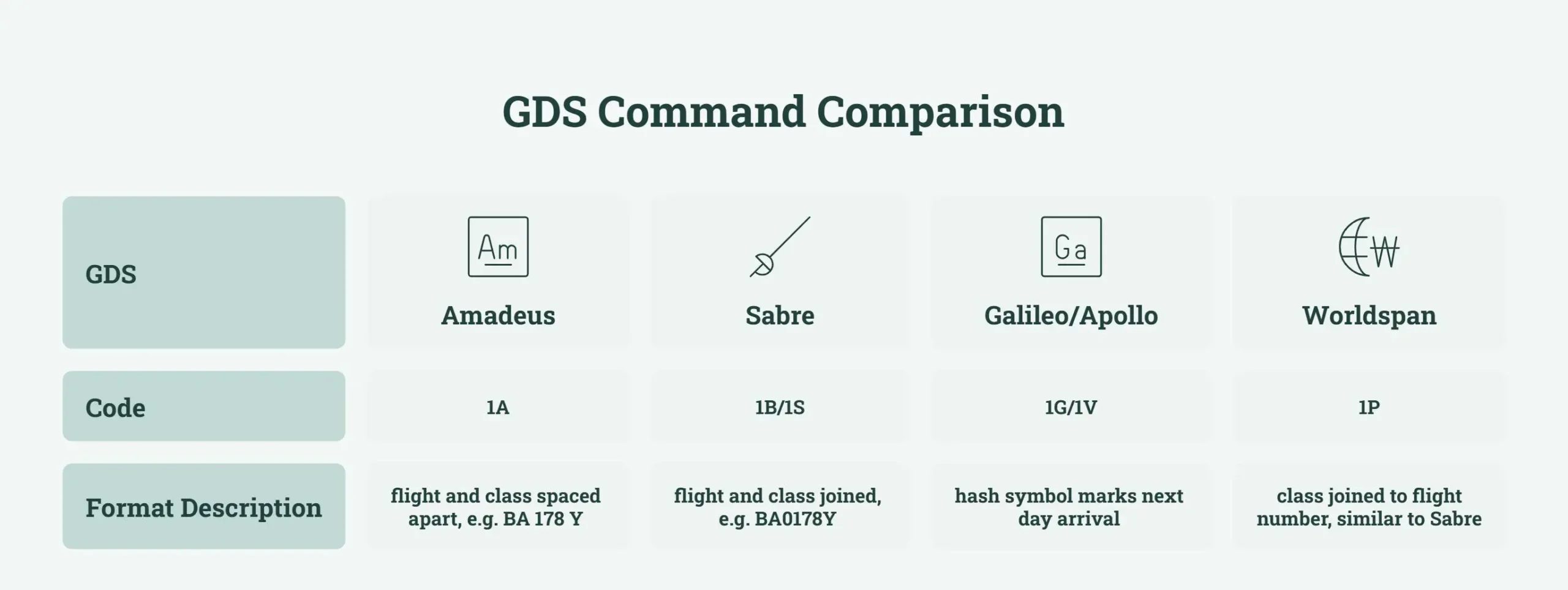
- Amadeus (1A)
- Sabre (1S / 1B)
- Galileo / Apollo (1G / 1V)
- Worldspan (1P)
How our PNR Converter Works?
Video Support for Itinerary Converter
GDS Segment Anatomy
Hover or click tokens to inspect parsing mechanics across global distribution systems.
Select any segment component
Hover over or click tokens in the terminal box above to reveal GDS parser mapping, positional rules, and validation criteria.
Works with Major GDS Platforms formats
This PNR Decoder supports a wide variety of easypnr formats from Amadeus, Sabre, Galileo, and Worldspan.
Below are some examples of supported formats.
Need support for another PNR format?
Convert PNR is continuously expanding its compatibility with Amadeus, Sabre, Galileo, and Worldspan. If your valid PNR doesn’t convert correctly, get in touch with us. We’ll review the format and consider adding support in an upcoming release.
Who Uses PNR Decoder?
✈️ Travel Agents
Turn a raw booking into a client ready itinerary without a separate formatting tool.
🛂 Visa Applicants & Visa Consultants
Create PNR for visa applications. A well-formatted itinerary is easier to review and can be used for applying visas.
🏢 Corporate Travel Managers
Generate one consistent itinerary format for every employee booking.
🌍 Online Travel Agencies (OTAs)
Show customers a clear itinerary right after a GDS booking is confirmed.
Why Choose Us?
Built for speed, accuracy, and convenience, Convert PNR helps travel professionals create clean, professional flight itineraries in seconds—without the hassle of manual formatting.
👤 No Sign Up for using
PNR Converter
Convert as many PNRs as needed, with no account and no daily cap.
No sign up is required at all to speed up your work.
🌍 Supports Multiple
GDS Formats
Our converter automatically recognizes raw PNRs from Amadeus, Sabre, Galileo, and Worldspan, making it easy to work with bookings from multiple GDS platforms in one place.
⚡ Fast & Accurate
PNR Decoder
Simply paste your raw PNR, and the itinerary converter instantly extracts and organizes your booking details into a clear, professional itinerary. No manual editing or formatting required.
✈️ Smart Flight & Journey Organization
Flight segments are automatically grouped into outbound and return journeys,
with connection details and layovers displayed in a clean, easy-to-read format.
🎨 Custom Branding
Options
Personalize your itineraries by adding your agency name, logo, or custom notes to create a professional experience for your clients.
🔒 Privacy
First
Your PNR is processed and run securely within your browser. We don’t store, log, or upload your booking information, helping keep your travel data private.
📱 Work on Any
Device
Use this on your desktop, tablet, or smartphone. There’s nothing to install or configure—just open the tool and start converting.
What is PNR ?
A Passenger Name Record (PNR) is a reservation record that holds a passenger’s booking details. It is identified by a booking reference, also called a record locator, which is commonly a short combination of letters and numbers. A GDS creates this record the moment a flight is booked, whether by a travel agent, an airline call center or an online travel agency. It holds the passenger’s name as it appears on their passport, each flight segment with its date and time, the booking status, contact details and any special requests such as a wheelchair or a child meal.
What is GDS?
A Global Distribution System connects airlines, hotels and travel agencies to one shared booking network. Amadeus, Sabre and Travelport, which runs Galileo, Apollo and Worldspan, are the three GDS platforms used across most of the travel industry today.
Frequently Asked Questions
From decoding complex airline reservation records to generating professional flight itineraries, our PNR Converter is built for accuracy, speed, and privacy. Trusted by travel professionals, it supports leading GDS systems and helps streamline your daily workflow with ease.